unilad homepage
unilad homepage
  • News
    • UK News
    • US News
    • World News
    • Crime
    • Health
    • Money
    • Sport
    • Travel
  • Music
  • Technology
  • Film and TV
    • News
    • DC Comics
    • Disney
    • Marvel
    • Netflix
  • Celebrity
  • Politics
  • Advertise
  • Terms
  • Privacy & Cookies
  • LADbible Group
  • LADbible
  • SPORTbible
  • GAMINGbible
  • Tyla
  • UNILAD Tech
  • FOODbible
  • License Our Content
  • About Us & Contact
  • Jobs
  • Latest
  • Archive
  • Topics A-Z
  • Authors
Facebook
Instagram
X
Threads
TikTok
YouTube
Submit Your Content
People are only just finding out they can stack emojis on iPhone and create 'new' ones
Home>Technology>News
Published 17:44 29 Apr 2024 GMT+1

People are only just finding out they can stack emojis on iPhone and create 'new' ones

Lock up your moms and dads because there's a way you can stack emojis and form 'new' ones

Poppy Bilderbeck

Poppy Bilderbeck

google discoverFollow us on Google Discover
Featured Image Credit: Westend61/Getty / TikTok/koral_kristen

Topics: Apple, Phones, Social Media, Technology, Twitter, iPhone, TikTok

Poppy Bilderbeck
Poppy Bilderbeck

Poppy Bilderbeck is a freelance journalist with words in Daily Express, Cosmopolitan UK, LADbible, UNILAD and Tyla. She is a former Senior Journalist at LADbible Group. She graduated from The University of Manchester in 2021 with a First in English Literature and Drama, where alongside her studies she was Editor-in-Chief of The Tab Manchester. Poppy is most comfortable when chatting about all things mental health, is proving a drama degree is far from useless by watching and reviewing as many TV shows and films as possible.

Advert

Advert

Advert

Lock up your moms and dads because there's a way you can stack emojis.

It's bad enough when your mom texts you to see if you're still coming for dinner and proceeds to use an eggplant emoji followed by a winky face. Then there's when your dad says he's had to postpone mowing the lawn because of the rain and uses the splashing one. Now, imagine if your parents knew they could literally stack certain emojis together in one big picture. *Shudders*

What's the update?

If you're over the age of 40 or simply like whacking out a few emojis here and then to spice up a cheeky iMessage, there's now a way to up your game.

People are flooding to social media after being left 'mind blown' realising you're no longer limited to just sending one emoji at a time on your iPhone or other Apple device, but can actually stack certain emojis together to paint more of a picture of what you're trying to say - or perhaps you're simply bored on the train and trying to make some pretty pictures.

Advert

But how do you go about stacking emojis?
There's a new way to jazz up your iMessages (Jakub Porzycki/ NurPhoto/ Getty Images)

How to stack

First up, it's probably useful if you open up iMessage, tap on the text field and click on the button which shows you all of Apple's emojis

Next, you decide which emoji you want to serve as the stack's base layer. For example, if I decided to try and recreate a scene out of The Little Mermaid, I'd probably start with waves or water.

Click whichever emoji you want as the base, press down and then drag it into the empty text field of your message.

FY, you can't change this first base layer later on, so make sure you're certain. When you're ready to commit, press send and the collaging has begun.
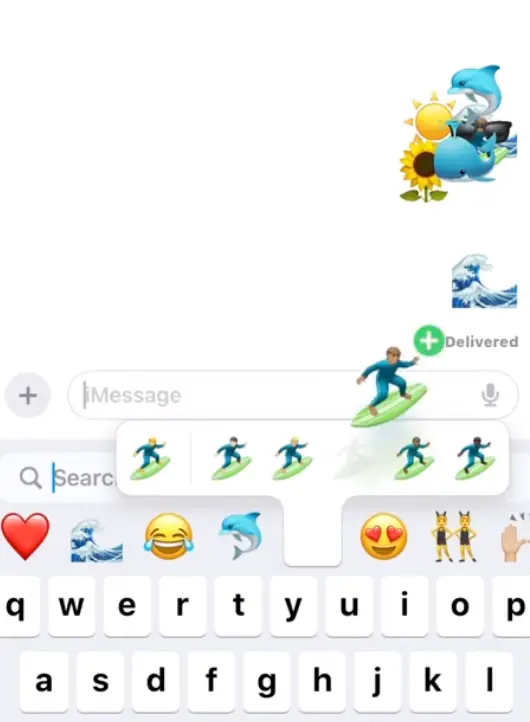
You can create whole scenes now using emojis  (TikTok/ @koral_kristen)
You can create whole scenes now using emojis (TikTok/ @koral_kristen)

Then you simply repeat the process, finding another emoji, tapping, holding and dragging, this time on top of the base emoji sticker and you keep going until you're happy with the finished product.

Fear not if you're not convinced by one of the second or above emoji's placings, you can adjust them by pressing down and dragging it around. Although, if you're on an iPhone opposed to iPad or Mac, this requires pretty surgical-like precision and no fumbling thumbs. You can also pinch in and out on an emoji to resize it. Or, if you decide against one completely, you can just tap and hold and a menu will appear, you click 'Sticker details' and then swiping left will help delete it.

And it's not taken long for people to flood to social media in awe of the hack.
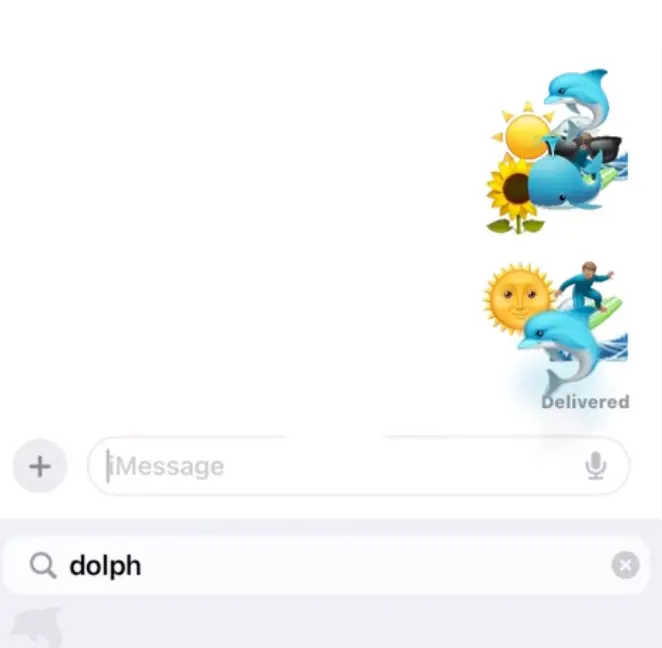
The feature has left people 'mind blown' (TikTok/ @koral_kristen)

One TikToker - who goes by @koral_kristen - took to her page yesterday (28 April) to state: "I WAS TODAY YEARS OLD WHEN I FOUND OUT YOU CAN STACK EMOJIS."

"[...] MIND BLOWN."

And the conversation has spilled onto X too, a user noting: "What a fabulous new way to waste time."

"It works," another confirmed

And a third wrote: "Cool didn't know."

Choose your content:

2 days ago
11 days ago
17 days ago
18 days ago
  • Getty Stock
    2 days ago

    Facebook down as thousands of users hit with same message

    The site is unavailable for those on a desktop

    Technology

    breaking

  • Getty stock image
    11 days ago

    Little known iPhone trick can stop people from being able to snoop through your phone

    Apple actually built the feature for a completely different reason

    Technology
  • Marvel Rivals
    17 days ago

    New Captain America suit in Marvel Rivals video game sparks controversy with X-rated detail

    Captain America's celebrating the Fourth of July in a very unique way...

    Technology
  • David Paul Morris/Bloomberg via Getty Images
    18 days ago

    Mark Zuckerberg weighs in after Bill Gates predicts four jobs will survive AI

    Mark Zuckerberg was at odds with Bill Gates' claim that AI would take over the workforce

    Technology
  • Little known iPhone trick can stop people from being able to snoop through your phone
  • Apple fans in horror after finding out how much new 'iPhone pocket' will cost and what it does
  • iPhone users stunned after discovering charging life hack and question why they never did it before
  • iPhone users are just discovering what the orange and green dots on their screen really mean